
Default outbound access will not be default anymore
 By the 31st of March Microsoft changes the default outbound behavior for virtual networks. What does that mean for you and do you really know how your virtual machine reaches internet?
The new default behavior
From the end of this month the default behavior that allows virtual machines to reach internet directly will be changed. The feature that will be the new default already exists, but is something that you need to opt in to use. That feature is called “private subnet”. So if you look at a subnet in the Azure portal the change that is introduced will look like this:

NOTE: This change will only apply to virtual networks that are created after the 31st of March 2026 and will not impact existing virtual networks or virtual machines that are deployed within them.
You will still be able to opt out of using private subnets but since Microsoft is doing this change based on input from the community, should you really do that? My opinion is that you shouldn’t, since you probably want control over your outbound traffic. When using default outbound your virtual machines uses a random IP address for egress traffic and it’s not something that you can predict, meaning that you won’t know what address you are coming from. That will be a problem if you have suppliers that rely on you to reach them from anticipated IP addresses. Before we look in to what solutions you can use to adapt to private subnets, let’s determine if you are using “default outbound access”. It might be that you have it enabled but aren’t using it.
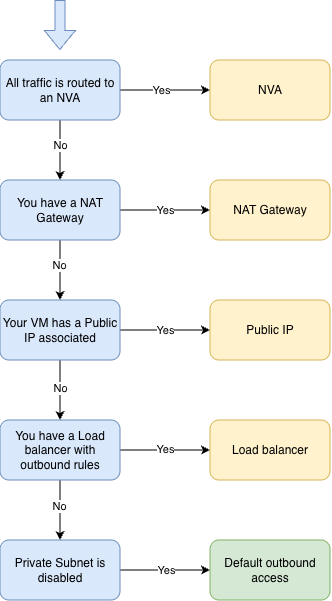
As you can see, you might sill be using an explicit public IP address even if you don’t use private subnets and have default outbound access enabled.
Disabling default outbound access
As I have shown in the one of the images above, you can disable default outbound access in your existing environment by enabling private subnets. When you do that you need to restart the virtual machines within that subnet before the change takes effect. Meaning that the virtual machine can still use default outbound access until they are restarted. Once that is done the virtual machine can’t reach internet anymore, good. But maybe it should be able to reach internet, and in that case we need to configure an explicit outbound connectivity. Here are some examples on how we can do that.
Outbound connectivity through NVA
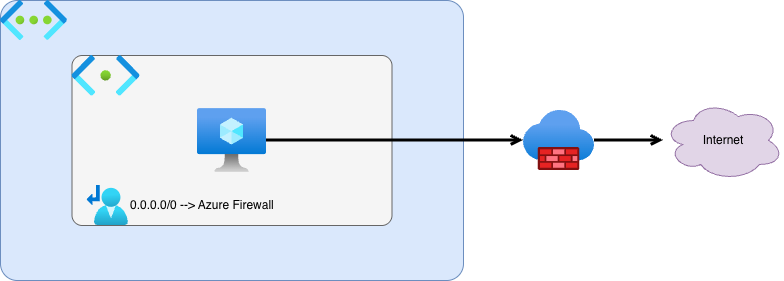
This is my preferred choice when building networks in Azure. Here we route all traffic that is destined for internet through the NVA, and that can be an Azure Firewall. Using this type of explicit outbound connectivity in a hub-and-spoke topology can give you more control over your entire Azure environments outbound connectivity.
Outbound connectivity through Public IP resource
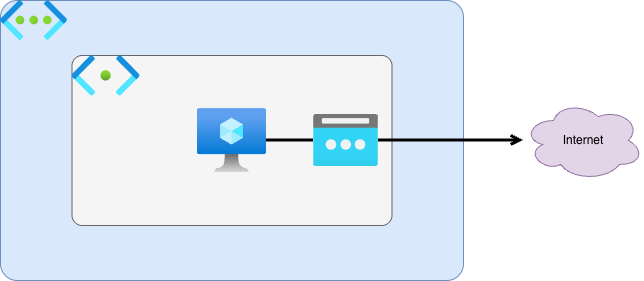
By associating a Public IP resource to your virtual machine you can get an explicit IP address that your virtual machine egresses to internet from. This approach requires you to deploy a Public IP to each of your virtual machine that needs outbound connectivity. That will result in many public Ip addresses that are used within your organization, and even withing the application teams. This might cause some challenges when the environment grows.
Outbound connectivity through NAT Gateway
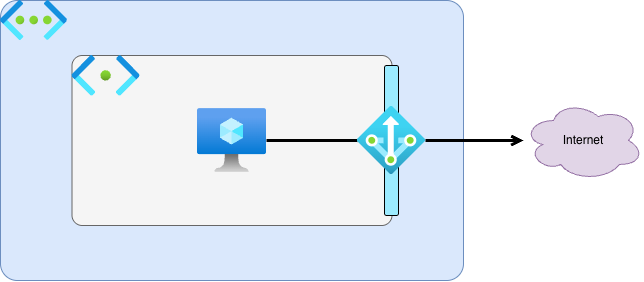
You can also gather virtual machines from different subnets in a virtual network behind the same explicit public IP address by using a NAT Gateway for outbound access. NAT Gateway is the recommended outbound access for virtual networks, if you aren’t securing the outbound access with a Firewall. You can read more on how to configure a NAT Gateway on Microsoft Learn
Outbound connectivity through Azure Load Balancer
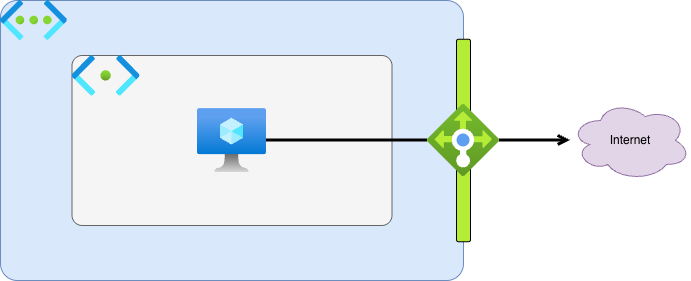
This is not something I have deployed before, since I the first three options has worked for me. But you can configure an Azure Load Balancer to handle outbound connectivity with either defined outbound rules or with outbound SNAT for default port allocation. If you want to test this solution you can read more here.
Conclusion
Even if you don’t have to adopt private subnets after the 31st of March, you should consider keeping in line with the new default behavior. Both the community and Microsoft has agreed that this is the recommended way to configure your virtual networks moving forward. I would even suggest to investigate your current environment and start to configure explicit outbound access for your existing virtual networks that connects to internet from random IP addresses.