
Scaling with Azure Virtual Network Routing Appliance
 Earlier in February Microsoft announced the public preview of the service and there has been a few posts on how to deploy and configure it, so I won’t cover that in this post. But if you want to look at the details of Azure Virtual Network Routing Appliance you can read the documentation on Microsoft learn, Azure Virtual Network Routing Appliance Documentation. In this post I will instead focus on the a scalability issue that I’m facing, where I run in to limits from the Azure platform and massive costs if I scale out with the current network design.
Using a more lightweight product in the hub can reduce coast and increase the speed, but with reduced control. In the following sections I will outline how hub-and-spoke is built today and how it can be modified with the use of Azure Virtual Network Routing Appliance.
Traditional Regional Hubs
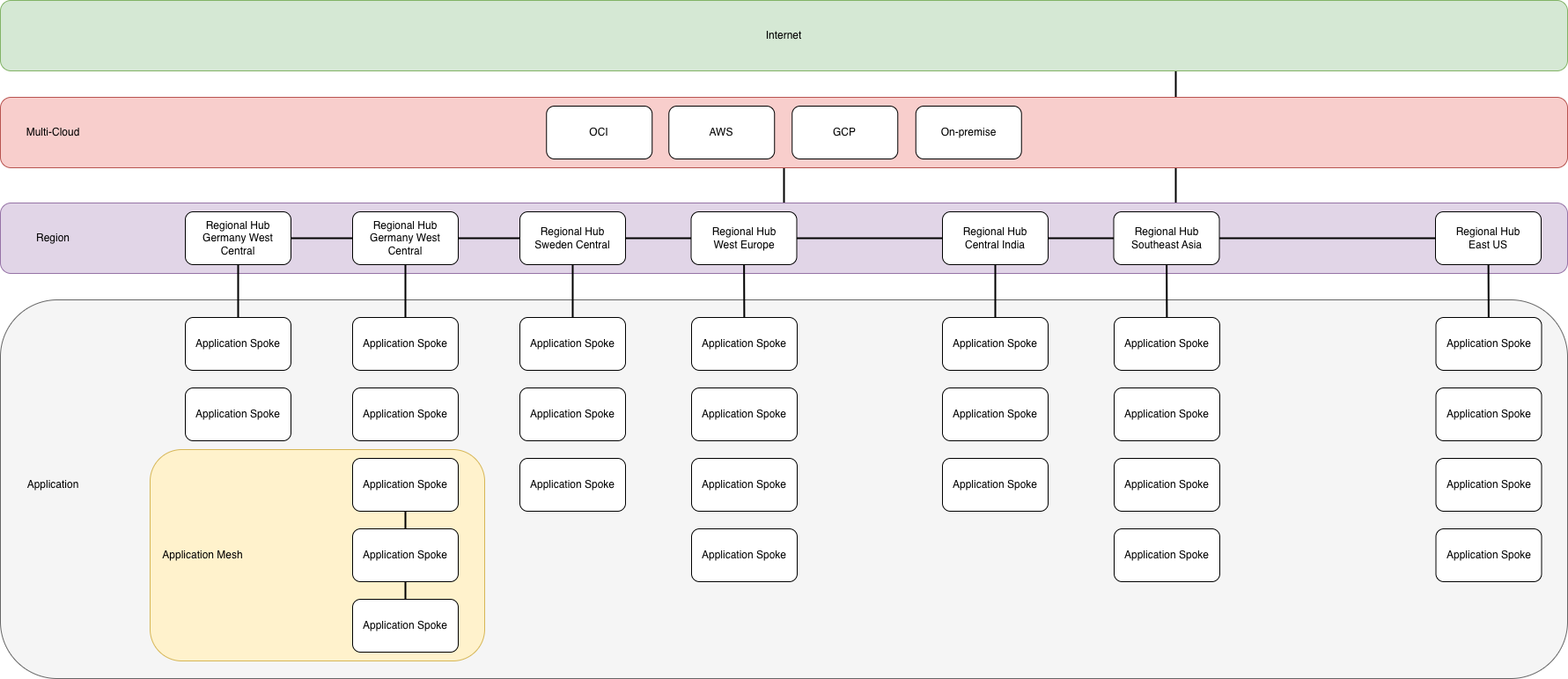
Regional Hubs
This concept features regional hubs, deployed per Azure region, that are capable of inspecting and filtering traffic that moves between spokes and across regions within the Azure tenant. They also provide connection to the Multi-cloud connectivity service and internet egress and ingress. The regional hubs are connected in a mesh pattern to allow applications to take the shortest path to each of the region that are used. The regional hubs contains the following services:
- Azure Firewall
- Virtual Network Gateway
- External application delivery solution
- Internal Application Delivery solution
- DNS Private Resolver
Regional hubs can also support direct connectivity to other cloud provides, for example FastConnect to OCI where there is hubs in the same supported regions.
Applications
Applications are connected to the regional hub that is deployed in the same region as the application, in a hub-and-spoke pattern. All traffic that leaves the application is sent to the regional hub where it’s inspected and evaluated before being routed to the destination. This will happen regardless of where the destination is located.
Application Mesh
To reduce some load on the regional firewall and lower the latency for applications that will talk a lot with one and another or will send real heavy data between each other can be configured in a regional mesh. This will allow the selected applications to communicate directly with each other without passing through the regional firewall.
Notes
All connectivity patterns are configured and managed centrally through Azure Virtual Network Manager. The same goes for routing configurations for the applications. The target is that the application teams never need to worry about the connectivity. Routes for the regional hubs are managed through IaC templates since they are different between each hub, and requires configuration every time a new hub or a new spoke is added to the environment.
Pros
- All traffic that flows within the environment in secured by the regional hubs and you have have full control from a central perspective over what applications can talk to one and another.
- Simple hub-and-spoke configuration per region.
- Application mesh controlled and managed centrally.
Cons
- The hubs are expensive and one needs to be deployed in each region that are used in Azure.
- Limit of 400 spokes per regional hub, because of GatewaySubnet route table in each hub is limited to 400 routes.
- More load on the firewalls since all traffic moves through the hub as a standard. Will increase cost and latency.
Geographical Hubs - With Azure Virtual Network Routing Appliance in regional hubs
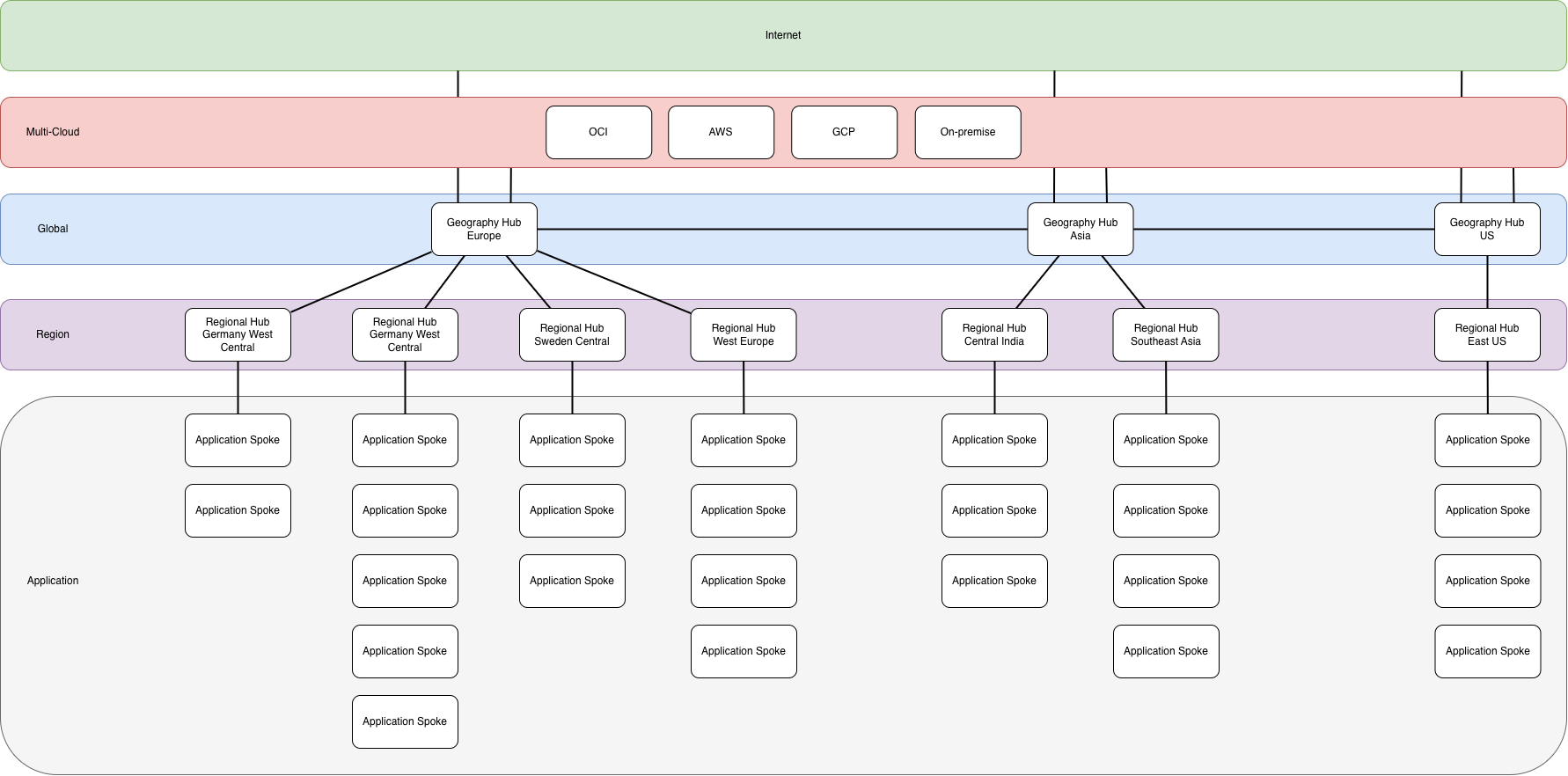
Geographical Hubs
This concept features geographical hubs, deployed per geographical area, that are capable of inspecting and filter traffic that moves between geographies or regions based on the requirements. These geographical hubs will also provide application delivery (internal and external), connection to the multi-cloud connectivity solution and act as an internet breakout for Azure applications.
The geographical hubs are connected in a mesh pattern and enabled applications to connect between different geographies.
The geographical hubs contains the following services:
- Azure Firewall
- Virtual Network Gateway
- External application delivery solution
- Internal Application Delivery solution
- DNS Private Resolver
Geographical hubs can also support direct connectivity to other cloud provides, for example FastConnect to OCI where we have hubs in the same supported regions. What hub that provides this functionality is based on the security requirements.
Regional Hubs
Regional hubs are more lightweight and are intended to just route traffic throughout the region. Depending on the security and performance requirements these hubs can be connected with the geographical hub in a hub-and-spoke pattern to enforce traffic filtering and inspecting when moving between regions, lowering performance but increases security. Or they can be connected in a mesh pattern allowing higher performance when moving traffic between regions but removes the inspection and filtering of traffic within the same geography.
This is a possibility that is unlocked thanks to Virtual Network Routing Appliance.
Regional hubs can also support direct connectivity to other clouds, for example OCI with FastConnect. This allow Azure to stand up a lightweight regional hub in the same regions as for example OCI, but we can’t on the Azure side filter the traffic going to OCI. If OCI is allowed to connect to all application spokes to the region, the limit will be 400 spokes per regional hub due to the limit in route tables, that is if the multi-cloud connectivity relies on VPN gateways in the hub. If this isn’t used the limit will be 1000 spokes per regional hub with the help of Azure Virtual Network Manager.
Application
Applications are connected to the regional hub that is deployed in the same region as the application, in a hub-and-spoke pattern. All traffic that leaves the application is sent to the regional hub to be routed to the destination. Application mesh isn’t needed since the regional hub is a high capacity, high throughput router in the same region that adds minimal latency.
Notes
All connectivity patterns are configured and managed centrally through Azure Virtual Network Manager. The same goes for routing configurations for the applications. The target is that the application teams never need to worry about the connectivity. Routes for the geographical and regional hubs are managed through IaC templates since they are different between each hub, and requires configuration every time a new hub
Pros
- Less expensive hubs due to usage of lightweight regional hubs.
- Less load on the firewalls, reducing cost.
- Lower latency and higher throughput on application to application traffic.
- Regional hubs can support up to 1000 spokes.
- Less peerings since no application mesh is needed, reducing cost.
Cons
- More complexity in the design.
- Less control of traffic moving between applications.
- Virtual Network Routing Appliance is in public preview and needs to be generally available before use in production.
Conclusions
Based on the your security and performance need this design with the help of Azure Virtual Network Routing Appliance allows you to tweak the patterns of connectivity in multiple ways. Either to increase performance or security. This is a concept design, but the idea is to use the Azure Virtual Network Routing Appliance to reduce cost by limiting the data processed by the central firewalls or the amount of peerings that is needed within Azure. Whether this is an option or not will be determined once Azure Virtual Network Routing Appliance goes general available and we can test the actual performance and see the pricing details on this service.