
Azure Virtual Network Routing Appliance Performance
 After the last post I got access to the public preview of Azure Virtual Network Routing Appliance (NVRA) and I wanted to see what impact it would have on the network. As mentioned in the last post, Scaling with Azure Virtual Network Routing Appliance, NVRA could act as a high speed lightweight hub and limit the need to mesh applications together and with that keep the amount of peering down.
The test will be conducted in three stages to compare the throughput and latency when implementing the NVRA. The purpose is to see if there’s any degradation or how much degradation it is when NVRA is added to the traffic flow. First will be the baseline, just to get the measurements from two virtual networks directly peered with eachother, the second will have a NVRA as a hub between the two virtual networks, and the third will have two NVRA between the virtual networks to simulate moving between two hubs. Due to limits in the public preview all resources will be deployed in West Europe region, but that’s fine. Because the goal is to see what effect the NVRA has on the network.
The test will be kept simple, ping test to measure an average latency and iPerf3 to measure throughput.
NVRA Configuration
There’s not much to configure when it comes to the NVRA. The bandwidth for the NVRA is set to 50 Gbps (since that what I got for the public preview) and it will be deployed to a /24 subnet to scale out within. There was a table when I created the first instance of NVRA that showed how many units it scaled out to based on the size of subnet that you deployed it to, but I cant for the life of me find that again. If I find it I’ll add it to this post.
First test - Directly peered
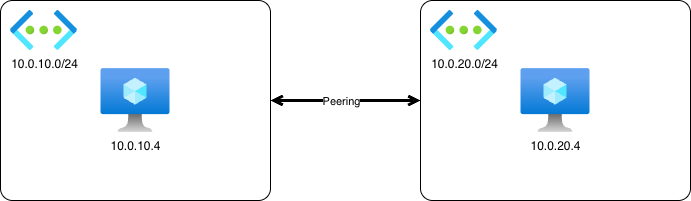
Ping
Command:
ping 10.0.20.4
Result:
--- 10.0.20.4 ping statistics ---
20 packets transmitted, 20 received, 0% packet loss, time 19028ms
rtt min/avg/max/mdev = 0.738/2.783/12.846/3.557 ms
iPerf3
Command:
iperf3 -c 10.0.20.4
Result:
[ ID] Interval           Transfer     Bitrate         Retr
[  5]   0.00-10.00  sec  14.0 GBytes  12.1 Gbits/sec  2694             sender
[  5]   0.00-10.01  sec  14.0 GBytes  12.0 Gbits/sec                  receiver
Second test - One NVRA
 Command:
ping 10.0.20.4
Result:
--- 10.0.20.4 ping statistics ---
20 packets transmitted, 20 received, 0% packet loss, time 19026ms
rtt min/avg/max/mdev = 2.994/4.516/13.487/3.104 ms
iPerf3
Command:
iperf3 -c 10.0.20.4
Result:
[ ID] Interval           Transfer     Bitrate         Retr
[  5]   0.00-10.00  sec  4.15 GBytes  3.57 Gbits/sec  1574             sender
[  5]   0.00-10.01  sec  4.15 GBytes  3.56 Gbits/sec                  receiver
Command:
iperf3 -c 10.0.20.4 -P 10
Result:
[ ID] Interval           Transfer     Bitrate         Retr
[SUM]   0.00-10.00  sec  13.4 GBytes  11.5 Gbits/sec  10268             sender
[SUM]   0.00-10.01  sec  13.4 GBytes  11.5 Gbits/sec                  receiver
Third test - Two NVRAs
 Command:
ping 10.0.20.4
Result:
--- 10.0.20.4 ping statistics ---
20 packets transmitted, 20 received, 0% packet loss, time 19030ms
rtt min/avg/max/mdev = 3.057/4.218/18.704/3.358 ms
iPerf3
Command:
iperf3 -c 10.0.20.4
Result:
[ ID] Interval           Transfer     Bitrate         Retr
[  5]   0.00-10.00  sec  4.23 GBytes  3.63 Gbits/sec  925             sender
[  5]   0.00-10.01  sec  4.23 GBytes  3.63 Gbits/sec                  receiver
Command:
iperf3 -c 10.0.20.4 -P 10
Result:
[ ID] Interval           Transfer     Bitrate         Retr
[SUM]   0.00-10.00  sec  13.1 GBytes  11.3 Gbits/sec  9770             sender
[SUM]   0.00-10.01  sec  13.1 GBytes  11.3 Gbits/sec                  receiver
Result summary
| Test | Latency (avg) | Throughput single flow | Throughput 10 flows |
|---|---|---|---|
| Direct Peering | 2.783 ms | 12.1 Gbits/sec | n/a |
| One NVRA | 4.516 ms | 3.57 Gbits/sec | 11.5 Gbits/sec |
| Two NVRA | 4.218 ms | 3.63 Gbits/sec | 11.3 Gbits/sec |
Conclusion
The purpose of this test was to validate the design I presented in my previous post where you utilize the NVRA service to build smaller high throughput hubs in each region where you have presence in Azure. Whether the capacity that NVRA can handle is enough will be determined by the applications that you run in Azure, but I would say that it doesn’t limit the capacity in a way that would deter me from using it in my scaled out network design once it’s generally available.
I hope that this data will be useful for you and that it’s enough to help you consider NVRA in you network in the future. But keep in mind that these numbers are from the public preview of the NVRA service.